Easy 3D with WebGL and Three.js

Lately a lot has been happening in 3D around the world. From movies to electronic gadgets like televisions, projectors and gaming consoles, everything seems to be heading toward rendering that additional 3rd dimension. A 3D experience in itself so very enticing that one would just falling it love with it; and thus the creative ones amongst us are constantly thinking about various areas wherein it could be applied. Some of the obvious areas of application would be bio-technology, clinical research, engineering drawings and entertainment media; but meanwhile some creative minds amongst us have gone ahead thinking differently and even made simple software applications that we use in our everyday lives, to render a user interface with 3D. For instance, a few months ago I came across a program called 3DNA Desktop which improves the way we work with Windows and the Web. With 3DNA Desktop one can choose from different 3D worlds to explore and customize the same, to create an immersive and entertaining 3D desktop usage experience.

Screenshot of 3DNA Desktop

As a developer, I've always thought about how these awesome experiences are created. For a while I did try to play around with Adobe Flash, but to by candor found it too exhaustive to understand in a short time; therefore all the time continued to wonder, if there is something simpler, and above all free of cost, which could yield the same results or even better. Until recently, that I came across WebGL.

WebGL is a cross-platform, royalty-free web standard for a low-level 3D graphics API based on OpenGL ES 2.0, exposed through the HTML-5's Canvas element in a Document Object Model (DOM). So, what it essentially means is - now you can have Adobe Flash like experiences created within standard HTML using the Canvas element. You must have seen so many fancy user experiences built atop Adobe Flash, so obviously are wondering how exactly does WebGL compare against Adobe Flash? Therefore, to augment your curiosity here is an example that I built to demonstrate the capabilities WebGL, which shows a real-time day light view of our planet. Just try interacting with the globe using your mouse or touch-pad to get the real feel of the thing. Meanwhile, a quick note about the support – you need to make sure that your browser supports WebGL content rendering for running this example. Ideally one would need Google Chrome, Firefox 4+ or IE 9+ to run this one at its best.
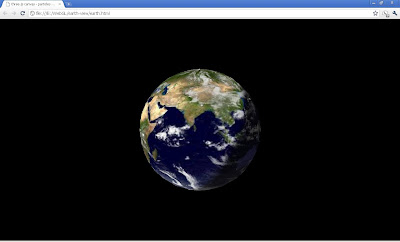
Screenshot of the WebGL and three.js example

A software programming enthusiast would furthermore be amazed to know that this is entirely done using standard Javascript and Mr.Doob's awesome script library called three.js, in just over 80 lines of code (LoC); you might want to right-click and choose to view the source on the example page to have a look at the code for yourselves. Three.js is a framework library developed by Mr. Doob that skillfully abstracts away the complex mathematics involved in implementing 3D, and provides simple APIs with which you can create cameras, objects, lights, materials and more; with a choice of renderers, which means you can decide if you want your scene to be drawn using HTML-5's canvas, WebGL or SVG within a standard browser.

Now, should this little article and the example inspire you to get your hands dirty with some code. The best place to start would be the three.js sources and bundled examples. You may download the latest release of three.js from GitHub (https://github.com/mrdoob/three.js) and get started with simple examples in absolutely no time. :)

Wishing you happy exploration of WebGL and three.js...

Have fun!!!

Table2Visualization : Rendering Google Visualization Charts with HTML Tables

With the advent of the analytics age, one would find applications spring-up every month that lets you track, monitor, and analyze just about anything, from human habits to system behaviors. Such applications generally have a standard implementation pattern wherein they primarily collect, upload, process, and display data. Now, somebody trying to develop one such application would obviously face challenges, of different kinds, at each of these points depending upon the domain of applicability. However, the challenges in displaying the data, in a way that it is understandable to non-professionals, are the same for all of them.

Oftentimes, we rely upon statistical charts and graphs to render such data. These days one would find a plenty of charting libraries that make this possible easily (and some of them without any cost), for example Visualize, MooCharts, ProtoChart etc. One such player in the world of data visualization is Google itself.

Google Visualization is a set of JavaScript libraries that offer a wide range of data representation options with an easily pluggable API. It enables a developer to render statistical charts and graphs from a wide range of data-sources. However, as a developer, I always felt that a very simple and basic data source was always missing in that exhaustive list of data sources; and that is HTML tables. My searched across the web for an answer, either resulted in vein or a complex process with involved importing the data in a Google Docs spreadsheet and then rendering a chart from there. In simple words, there was nothing “Simple and Sweet”.

So, here I had a problem in-hand and decided to solve it for myself and all my fellow developers around the world. The implementation is now available on Google Code at the following location, with a sample to help you jump-start

http://code.google.com/p/table2visualization

GMail does not understand dots...

I recently discovered some little-known ways to use a GMail address that can give you greater control over your inbox and save you some time. Actually, when you choose a Gmail address, you actually get more than just "yourusername@gmail.com"; here are two different ways you can modify your Gmail address and still continue getting your mails:
  • Append a plus ("+") sign and any combination of words or numbers after your email address. For example, if your name was yourusername@gmail.com, you could send mail to yourusername+friends@gmail.com or yourusername+mailinglists@gmail.com.
  • Insert one or several dots (".") anywhere in your email address. Gmail doesn't recognize periods as characters in addresses -- Google mail just ignores them. For example, you could tell people your address was hikingfan@gmail.com, hiking.fan@gmail.com or hi.kin.g.fan@gmail.com.
For me, the real value in being able to manipulate your email address is that it makes it really easy to filter on those variants. For example you could use yourusername+bank@gmail.com when you sign up for online banking and then set up a filter to automatically star, archive or label emails addressed to yourusername+bank. You can also use this when you register for a service and think they might share your information. For example, I added "+yahoogrp" when I subscribed to some yahoo groups once, and now when I see emails from other groups to that address, I know how they got it and can apply a filter to auto-delete the mails.

Simple Serialization

The Simple XML serialization framework has released version 1.2. Simple is a serialization framework for Java that intends to provide an XML serialization framework that requires no configuration or mappings to serialize objects bi-directionally; i.e. to and from standard XML. Below is a list of some of the capabilities of the framework.

Simple framework with powerful capabilities
The framework used to provide XML serialization is simple to use and revolves around several annotations an a single persister object used to read and write objects to and from XML. Both serialization and deserialization are fully supported.

It requires absolutely no configuration

Unlike many of the XML frameworks for Java there are no mappings or configuration required to serialize objects regardless of its complexity, not even code to establish mappings. Everything is done at runtime, only annotations are required to perform the object to XML structure. The XML schema is represented using field and method annotations.

Converts to and from human editable XML
A primary goal for the framework is that the XML data used to deserialize and serialize objects is human readable. All XML elements and attributes take a simple structure that can be easily created with a text editor. Also the serialization format is compatible with the C# XML serialization format.

Contains an XML templating system
As part of the deserialization process template markers within the XML elements and attributes can be replaced with variables. This allows the system to be easily adapted for use as a configuration system with dynamic value substitution. Stock template filers include OS environment variable substitution, system properties, as well as an API that enables custom filters to be introduced.

Provides persister callback methods

During serialization and deserialization an object can recieve persister callbacks, to validate and prepare data during the process. Each callback allows the object to manipulate the persistance session, which allows values to be passed in to and out of the templating engine, and allows arbitrary attributes to be passed between the persisable objects.

Allows XML to drive composition
The serialization and deserialization process is controlled by an exensible strategy API, which allows objects to be created based on custom XML attributes. This allows interception of the object creation in order to delegate instantiation to object factories.

Fully self contained
For Java 6 the framework has no external dependancies and is completely self contained. For Java 5 two external JAR files are required, the StAX API and the StAX implementation, both are provided with the download.

Open source
Released under the LGPL and so can be fully integrated or adapted for both commercial and open source projects.

The Simple Home : http://simple.sourceforge.net

Is Java String really immutable...?

In many texts String is cited as the ultimate benchmark of Java's various immutable classes. Well, I'm sure you'd have to think the other way once you have read this article.

To start with, let's get back to the books and read the definition of immutability. The Wikipedia defines it as follows -

'In object-oriented and functional programming, an immutable object is an object whose state cannot be modified after it is created.'

I personally find this definition good as it mentions that an immutable instance's state should not be allowed to be modified after it's construction.

Now keeping this in the back of our minds, let's decompile Java's standard String implementation and peep into the hashCode() method -

public int hashCode() {
int h = hash;
if (h == 0) {
int off = offset;
char val[] = value;
int len = count;
for (int i = 0; i < len; i++) {
h = 31*h + val[off++];
}
hash = h;
}
return h;
}

A detailed look at the above code reveals this to be a classic implementation of the 'lazy evaluation' pattern; i.e. the String class instead of computing the hash value [1] during an instance's construction or [2] computing it each time the hashCode() method is called; computes it once, i.e. on the first call to hashCode(), and saves the computed value in the hash attribute.

Now, here is a test to prove the above quoted statement -

String string = "MyDearString";

Field field = String.class.getDeclaredField("hash");
field.setAccessible(true);

System.out.println("Before: " + field.getInt(string));

string.hashCode();

System.out.println("After: " + field.getInt(string ));

Anxious to know what the output would looks like? Here it is...

Before: 0
After: -1554135584

So this infers that for a given String instance which we create, but for which we never call hashCode(), the private hash field will remain to be zero. It is only changed when we call hashCode().

Well, don't you find this in contrast with the basic definition of an object's immutability?

One might argue that we can not observe a String instance in a different state without a reflective read of String's hash field and because the call to retrieve the state actually modifies it; if we can't observe it changing.

Well, if one doesn't observe a change does that mean it never happened...?

This reminds me about the other day when i scratched my new car, from below, against an irregular speed-breaker and my friend Manish said that I should not be worried about that because if a scratch is not visible its never been there. Well, is it really never there...?

However it seems like String is not immutable. Although it seems safe, ignoring reflective access, it definitely looks incorrect.

Post me your views around this...

Schematron - validating web-forms and java objects

Whilst developing web applications, more than often we are confronted with the need to validate user inputs. On the client-side (browsers) we generally do that with scripting languages; and for those users who have perhaps deliberately disabled their browser script support; we perform the same set validation on the server side, and this time we write some lines-of-code to extract the user input from the HTTP request and validate the same. Well, although ironic; yet it seems to be a de-facto that - we have to specify the validation rules separately on the client and server side, for eventually validating something that is semantically same.

A technical analysis into the core reason reveals that – although the semantics of the herein discussed "thing" (i.e. the user input) are the same, yet the representations of the semantic on the client and server side are different; which enforces us to implement the extraction and validation logic differently. So going by that theory - if we can represent the semantics of the user input in a single unified format, we can potentially have a single definition and implementation of the validation rules too.

So, what should our choice of a single unified data representation format? Well, there are a plethora of data representation formats out there; and you may be attracted to choose one that best suits your industry. However, as this article intends to project Schematron as a common validation solution across the client and server; I limited my choice to XML with intent to convey the concept with simplicity.

Dear JSON lovers, here is an excellent library by Stefan Goessner, which provides helper function for converting JSON to XML and visa-versa; So, that means - Schematron can be potentially used to validate JSON representations too.

So, let’s apply the concept to practice -

Before we apply Schematron to validate the user inputs on the client side; one must first convert the web form input to XML. The following archive illustrates an approach for converting a web form to XML and validating the same against a standard Schematron based schema –
Once we have validated the user input on the client, we forward the same to the server; wherein we should re-use our validation rules and this time execute the same on the server side. For many of you out there this is perhaps a no-brainer. Nevertheless, we will discuss this aspect in similar details with the next post in this series.

Until then wish you a merry Christmas and a safe holiday season.

Introducing Schematron

Schematron is a rule-based validation language for making assertions about patterns found in XML documents. It is a simple language which is based very much on XML itself and uses standard XPath to specify the assertion statements. The Schematron definations (a.k.a Schema) can be processed with standard XSL templates; which makes Schematron applicable is a variety of scenarios.

Although a Schematron defination is referred as a Schema, but one must understand that Schematron differs in the basic concept from other schema languages; i.e. it is not based on grammars but on finding tree patterns in the parsed document. This approach allows many kinds of structures to be represented which could be difficult with grammar-based schema languages. For instance - imagine how would a typical schema be, for the following XML document -

<?xml version="1.0" encoding="UTF-8"?>
<instance>
####<person>
########<fname/>
########<lname/>
####</person>
</instance>

Guess its a no-brainer! It would be something like this -

<?xml version="1.0" encoding="UTF-8"?>
<xs:schema xmlns:xs="http://www.w3.org/2001/XMLSchema">
####<xs:element name="instance">
########<xs:complexType>
############<xs:sequence>
################<xs:element name="person">
####################<xs:complexType>
########################<xs:sequence>
############################<xs:element name="fname" type="xs:string"/>
############################<xs:element name="lname" type="xs:string"/>
########################</xs:sequence>
####################</xs:complexType>
################</xs:element>
############</xs:sequence>
########</xs:complexType>
####</xs:element>
</xs:schema>

You must be already wondering about how different would the same schema look like in the "Schematron" world, right? Well, here is the answer -

<?xml version="1.0" encoding="UTF-8"?>
<schema xmlns="http://www.ascc.net/xml/schematron" >
####<pattern name="assert validity">
########<rule context="instance">
############<assert test="person">person element is missing.</assert>
########</rule>
########<rule context="person">
############<assert test="fname">fname element is missing.</assert>
############<assert test="lname">lname element is missing.</assert>
########</rule>
####</pattern>
</schema>

Now, isn't that a much better and understandable version of a schema?

A closer look at the above document would reveal how Schematron differs in the fundamentals of validating a document; the crux herein is not to define the structure of the document (that is what the traditional schema types do), but is to assert the structure. Imagine it to be something like JUnit or NUnit for the XML world; wherein one puts assert statements to check the validity of an object's state. And just like it happens in the JUnit or NUnit world; herein with Schematron also, one can have custom messages for assert conditions.

The Schematron can render custom messages in two cases, v.i.z. -

1. "Report" the presence of a pattern
2. and "Assert" the absence of a pattern

The following Schematron document illustrates the usage of the above discussed features -


<?xml version="1.0" encoding="UTF-8"?>
<schema xmlns="http://www.ascc.net/xml/schematron" >

####<!-- Render messages in case the elements are found. -->
####<pattern name="report validity">
########<rule context="instance">
############<report test="person">person element is present.</assert>
########</rule>
########<rule context="person">
############<report test="fname">fname element is present.</assert>
############<report test="lname">lname element is present.</assert>
########</rule>
####</pattern>

####<!-- Render messages in case the elements are not found. -->
####<pattern name="assert validity">
########<rule context="instance">
############<assert test="person">person element is missing.</assert>
########</rule>
########<rule context="person">
############<assert test="fname">fname element is missing.</assert>
############<assert test="lname">lname element is missing.</assert>
########</rule>
####</pattern>

</schema>


Now that we know how Schematron based schemas look like; the next obvious question is - "How to validate a document against a Schematron schema...?" Well, I already addressed that question in the first paragraph itself, with the following statement -

"The Schematron definations (a.k.a Schema) can be processed with standard XSL templates."

Following statements illustrate the basic processing involved in validating a document with Schematron -

xslt -stylesheet schematron-message.xsl SchematronRules.xml > compiled-SchematronRules.xsl
xslt -stylesheet compiled-SchematronRules.xsl TestData.xml

Now if that looks a little complex; here is a simple Schematron document validator (implemented in Java) which I developed to ease this complexity -

- Schematronize.java

The above listed validator requires the following XSL templates to be locally available -

- skeleton1-5.xsl
- schematron-message.xsl

Thats all for now... I’d leave it here for you to play. Hope you enjoyed reading this article. I will look forward to reading your feedbacks and implementation details around Schematron, so please do take a moment and drop in a note.

Adieu.

Some References -

- The Schematron Website
- The Academia Sinica Computing Centre's Schematron Home Page

IshaniQ: An Open-Source Java Platform for Quantitative Analysis

There is something fascinating about how students are learning software development today. Learning Java no longer needs to stop at loops, a...